campaign

Looking for an Airtable alternative? See how Grist compares.

Turn any spreadsheet into a secure business app with an MCP server

Almost everyone knows how to use a spreadsheet. So do AI agents.

An MCP server makes turning spreadsheets into well-structured, secure databases easier than ever.

The secret is structured data

table

Accurate. LLMs are better at parsing relational tables than regular text. This structure increases accuracy, reduces hallucinations and lets you use faster, smaller models.

build

Efficient. MCP-based tool calling connects LLMs with the right functionality without wasting time and tokens looking through code or documentation.

dashboard

Flexible. AI agents can build self-contained custom views, letting you build dashboards to your exact specifications in minutes and change them in minutes.

MCP three ways

1. Starting from scratch

If you know what you want, you can start right now. Using an MCP server means your agent won’t waste tokens analyzing documentation or the searching the web for how to build your app.

And because Grist is built upon a relational database, you know it’s going to be well-structured and ready to build on.

2. Starting from an Excel document/CSV

Have a critical spreadsheet that you can’t wait to replace? Adapt it to a better structure with MCP-enabled agents.

You’ll find yourself with a better structure, and an easy way to build custom apps upon that structure.

3. Agentic automation and iteration

Once you have a Grist document up and running, use agent skills and MCP tool calling to automate manual processes, and then make them better.

Then maybe automate making them better.
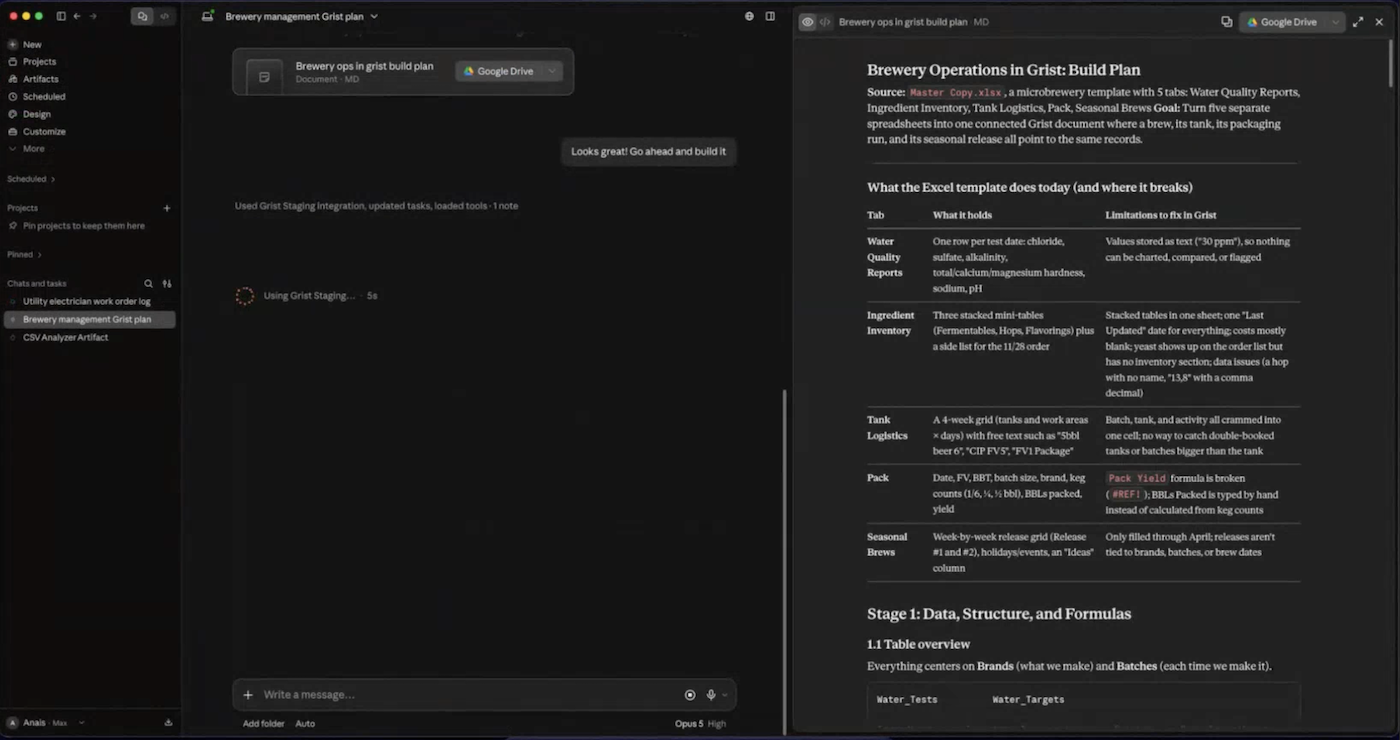
Using Grist + MCP w/ Claude for agentic iteration.
Grist + Claude via MCP to make and improve a doc plan

Try two sample apps built with MCP’s help

As an example, we built two apps in less than an hour with Grist’s MCP server during a live webinar.

  1. A work order tracker for field electricians from scratch.
  2. An operations document for a microbrewery from multiple existing spreadsheets.

You can play with the exact documents produced in less than an hour, and even use them as a template for your own microbrewery or electrical contracting firm.

Electrician Work Order Log

Open Full Template

Microbrewery Operations

Open Full Template

Beyond vibe-coding: building secure business apps

Grist’s unique structure and MCP implementation encourages coherent and effective vibe-coding. Building, managing, maintaining, deploying and redeploying apps can be effective and secure. Start building out of the box, or bring your own model and leverage agents and MCP tool calling.

The architectural advantage
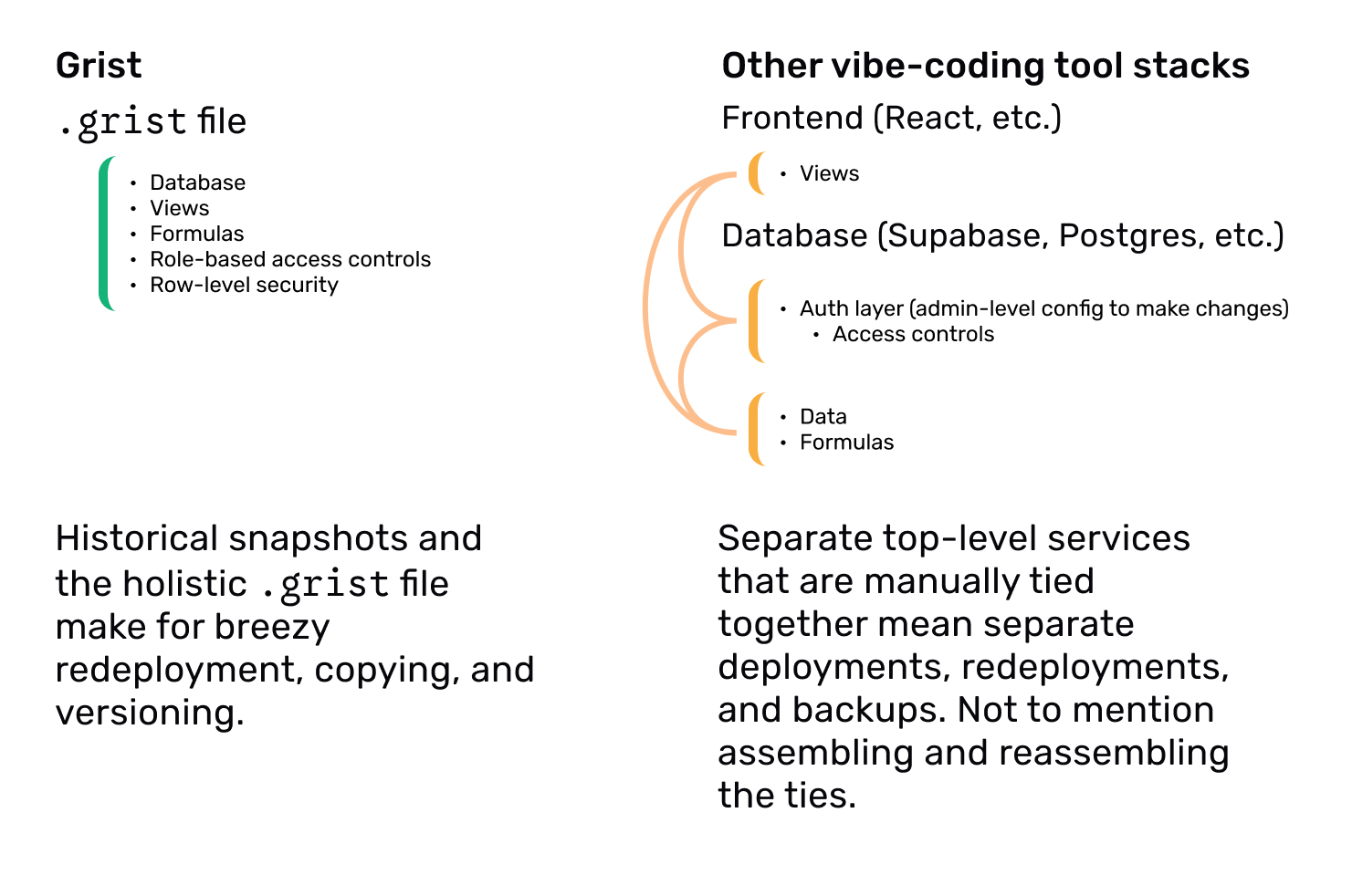
Comparison of the complexity between Grist and other vibe-coding stacks.

A .grist file holds an app’s data, its views, its business logic (as formulas), and its user permissions — both role-based access control (RBAC) and row-level security (RLS) — in a single portable, editable, self-contained artifact. Most vibe-coding stacks spread those same pieces across a separate frontend, database, auth layer, and storage.

Secure collaboration without compromise
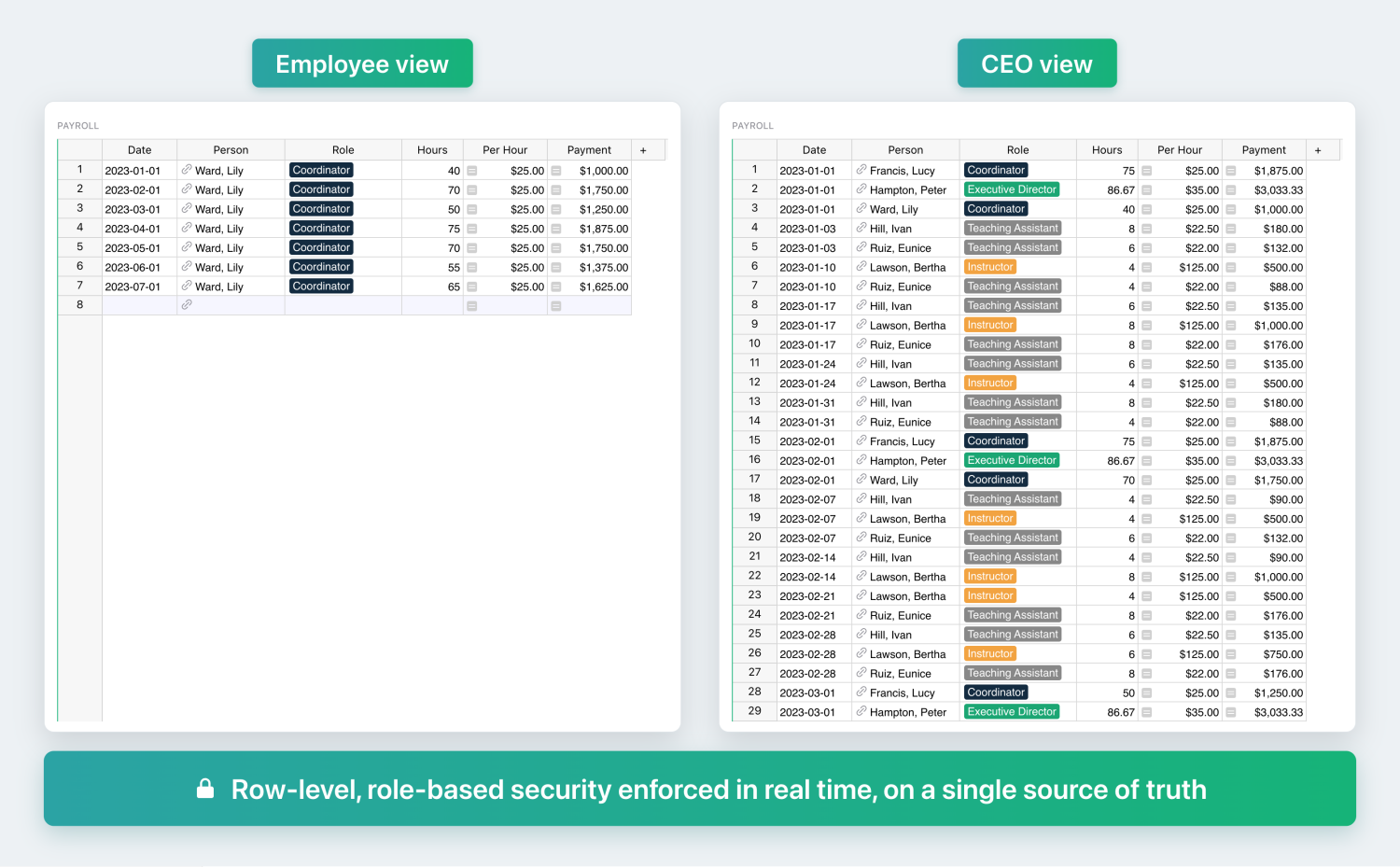
Example of what two types of users see within the same Grist document.

Grist’s unique access rules that are enforced server-side. Unlike spreadsheet security theater like hidden cells and locked documents, Grist prevents data leakage with explicitly defined and owner-customizable user roles.

Grist’s access rules are granular enough to enable permissions down to the cell, all without duplicating data for different audiences. These rules also apply to AI agents, preventing automated circumvention.

“I love Grist. It’s crazy powerful. I still can’t believe what we’ve been able to achieve in it. It’s the dream that low-code was sold as for years – we can do incredible things in each column with Python and we can build our own widgets to run on those! Wild!”

Elliot Lee
User Researcher

“Grist has become our go-to for more complex, structured data. It sits somewhere between Excel and Access—powerful, relational, and flexible enough for prototyping real data-driven applications.”

Olivier Lambert
CEO at Vates

“The more I use Grist, the more I LOVE it. I have been surveying self-hosted database GUI tools, and I was consistently disappointed with their shortcomings or bugginess. Grist is the first to have tilted the balance the other way.”

Stephen S.
Publications, Personal City Guides

“Grist has given us incredible flexibility to solve data problems and find solutions, whether it is for a small team at the district, or at scale with the entire district staff. We’re really excited about the different ways we can use it going forward.”

Director of Product
EdTech Company

“What I like about Grist the most is its focus. It appears simple, but it’s very powerful in a focused way. Grist has really improved our workflow and communication.”

Chris Scott
Co-founder in Digital Marketing

“If people spend some time learning a new tool they’ll have more power to do their work and research. I said to one of my students, ‘You will be very very happy using Grist because you are miserable using Excel!'”

Eduardo Dalcin, Ph.D.
Biodiversity Informatics Expert

“Most CRMs don’t work the way Grist works. Grist’s layouts are simple and do exactly what we need.”

Jennifer Bledsoe
IT Tech at Law Firm

“I discovered Grist after becoming frustrated with the limitations of Excel and Google Sheets. Grist has been a breath of fresh air, especially with its ability to handle structured data in a way that feels familiar to anyone with experience in relational databases, but with the added flexibility of Python.”

Will Bailey
Small Business Manager

“Sharing an Access database is near impossible, but Grist makes sharing a relational database simple.”

Walt Rice
IT Consultant

“I needed an open-source master database that could connect to n8n and AI tools. After trying Notion, Airtable, Siyuan, Baserow, and NocoDB, I chose Grist for its Python-native AI support, flexible integrations, and simple n8n connections.”

Robin A.
Project Manager

“I’ve worked extensively with NocoDB, Notion, SeaTable, and Baserow, and Grist really stands out. The balance between spreadsheet-style flexibility and structured, low-code database design is excellent.”

Andriy Kostyuk
Automation Engineer, Founder at Enceladus

More resources

Building a complete app with Grist + MCP

Frequently asked questions

Where can I learn how to set up Grist’s MCP server?

The best way is to check out our in-depth documentation in our Help Center, which includes a one-click setup for connecting to Claude, and walkthroughs for ChatGPT and terminal apps.

What tools are available in Grist’s MCP server?

There’s a complete list of all available tools over in our Help Center, with sample prompts to show how they may be accessed.

What does the Grist MCP server cost?

The Grist MCP server is currently available to all Grist users at no extra cost, on Hosted Grist and on the full edition of self-hosted Grist, across all plans. This may change in the future.

Your MCP client may have its own requirements (for example, some clients only allow custom connectors on a paid plan). This depends on the provider, so check their pricing page for details.

Take control of your data

Unlock your data’s true potential with the better spreadsheet