
Grist is an ideal platform for vibe-coding business apps, and it comes down to one thing: the file format. A .grist file holds an app’s data, its views, its business logic (as formulas), and its user permissions — both role-based access control (RBAC) and row-level security (RLS) — in a single portable, editable, self-contained artifact. Most vibe-coding stacks spread those same pieces across a separate frontend, database, auth layer, and storage.
Keeping an app in one file instead of five changes three things: how coherently you can build it with an LLM, how easily you can deploy, copy, and version the result, and how you secure it. We’ll walk through each, comparing against a typical Lovable + Supabase setup since that’s the stack most vibe coders know, though most vibe-coding stacks are built the same way, with the app spread across separate pieces.
More coherent vibe-coding: why one file beats a wired-together stack
So why is a single file format so key to good vibe-coding? If you give the model an MCP connection across your whole stack, isn’t that the same? Sure, with MCP connectors the LLM can see all the tools it needs to edit an application. Context isn’t really the problem. The problem is that those parts were never designed to fit each other.
In the Lovable stack, a React frontend, a general-purpose Postgres database, an auth layer, and row-level security policies are each capable, general-purpose components, and something has to wire them together and keep them in sync. Every join is a query someone writes. Every view is custom code that has to be told the schema. Every permission lives somewhere separate from the data it guards. That coherence is assembled by hand, and reassembled every time something changes. That Supabase provides Postgres as a service, and Lovable looks to Supabase for data and security, validates how important it is to have security and data closely bound. Grist makes data and its security coherent to the end-user, not only to the backend or the LLM.
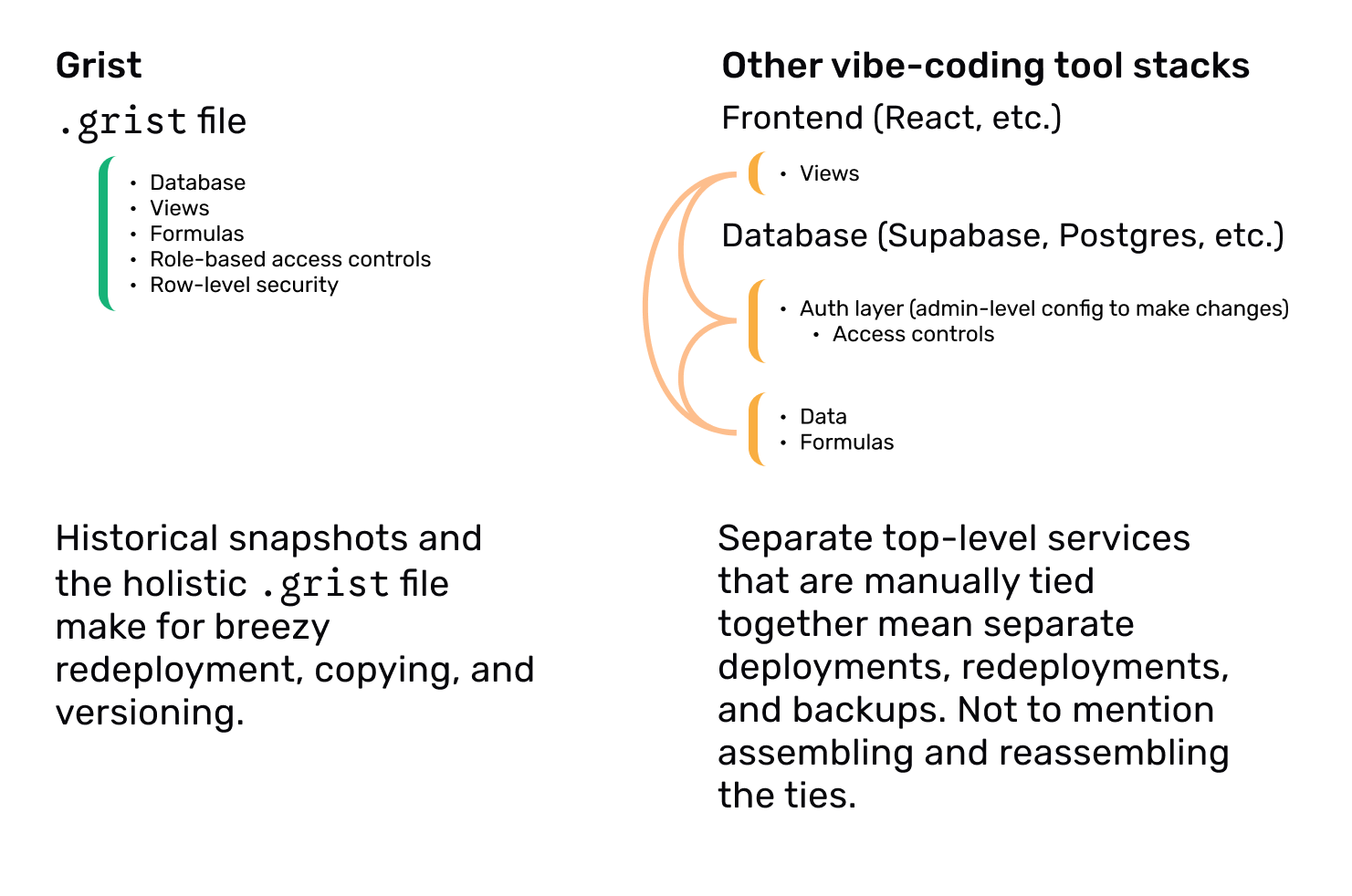
In Grist, the parts were built to fit. Linking related tables isn’t a query, it’s a reference column — one line. A view already knows the table it sits on, recalculates live like a spreadsheet instead of re-running a query, and shows only what the access rules allow, because the rules live in the same document. Fewer seams means fewer places for anyone, human or model, to get it wrong.
There’s a practical bonus, too. The whole Grist app is compact: its schema (views, formulas, access rules) lives in file metadata the model can read in one pass, instead of calling several MCP connectors to inspect pieces scattered across repos and databases.
Smoother on-prem deployment: self-host one file, not a stack
Coherence pays off while you build. The cost of a split stack shows up the moment you need to run the app somewhere you control.
A Lovable + Supabase app has no single artifact to move. If security isn’t paramount for your org, Lovable’s built-in publish flow with Netlify-style deployment works fine. But if you have real compliance, data-governance, or security requirements, you need to self-host, and that takes some doing. The Lovable editor exports a frontend codebase as a Git repo. The backend, typically Supabase, is a Postgres database. Both have to be redeployed to run on-prem. Moving the Supabase database from their hosted platform (where most Lovable apps start) to your own environment is a multi-step job: dump the database, move storage, files, and secrets, recreate auth, and reconfigure the environment. Not so simple for non-devs!
In Grist, self-hosting is one platform to stand up, and every app is just a file that runs on it. No per-app wiring. The app editor is also Grist, it runs on-prem too, and it can point at your own vetted model instead of a third-party API.
Copying and templating apps: duplicate a whole app in seconds
Deploying once is a project you can plan for. Copying an app is the cost you pay over and over, and it’s easy to underestimate how often you copy: to make a template, to stand up a staging environment, to hand a department its own instance, to prototype a big revamp without disrupting your team.
A faithful copy of a Lovable + Supabase app means reproducing the frontend deployment, the schema, the data, the storage buckets and files, the environment secrets, and the auth users. Even with an MCP wired across every service, duplication is a scripted, dev-owned procedure you build once and then maintain as the app changes.
In Grist, the app is the file, so duplicating it is literally as simple as copying a file. It takes seconds, whether a person clicks “Duplicate” or the model calls a tool to copy the document. Data, views, formulas, and access rules come along, because they were never separate to begin with.
Templating is the same move: copy a document, clear the data, and you have a reusable application starting point that already carries its structure, views, logic and permissions.
Versioning: roll back the entire app, not just the code
Copying forward and rolling back are the same idea from opposite ends, and versioning is where the single file matters most. In the split stack, git tracks the code but not the data. Schema changes ride along in migrations. Storage + RLS snapshots are not coherent with the full stack. There’s no single “here’s the app exactly as it ran on March 3rd” to check out, because no one artifact holds the whole app.
In Grist, there is. A version is a copy of the file, and the file is the whole application: schema, data, logic, and rules, restorable together as one thing. Grist keeps document snapshots on top of that, so undoing a bad change is as easy as restoring a snapshot. For a small oopsie, it’s as quick as ctrl+z.
Fewer dependencies to patch: lower supply-chain risk over time
Every Lovable app is a living codebase that has to be maintained. The exported app comes with an npm dependency tree: ongoing security patches, framework upgrades, transitive-dependency vulnerabilities, and supply-chain exposure that someone owns forever. Over a multi-year governance horizon, that generated code is a standing liability, not a one-time deliverable. Run ten apps and you have ten independently generated codebases, each with its own dependency tree to patch.
Most .grist apps have no dependency tree to rot or patch. The Grist platform has its own dependencies, of course, and every app built on it inherits those fixes. You patch one platform, and every document benefits.
There’s one caveat. Grist’s custom widgets let a vibe coder write front-end code (HTML, CSS, JavaScript) to read and write the data in a .grist in custom ways. Those widgets run sandboxed in an iframe and only receive data through Grist’s plugin API, subject to the same access rules, so a widget can render data creatively but can’t reach around RLS or RBAC to see data the user isn’t allowed to see. Self-hosted admins can control widget access levels and restrict sources and URLs. But a widget you grant data access to does see real data, so its code and any libraries it pulls in still need vetting, same as any app. If you want to get this deep into the controls, just ask for a demo!
Access control built in: RLS and RBAC owners can manage and audit
Patching is one half of security. Who controls access is the other, and it’s usually where governance quietly breaks down. In Supabase, RLS is attached to the database tables, which makes it a database-level concern only IT touches. As teams change, as people join or leave an app, as workflows shift, keeping those rules current becomes another IT ticket — if anyone remembers to file it.
In Grist, RBAC and RLS rules live in the application and are set by whoever owns it. They can read the rules in a table and test them in place, using Grist’s “view as” feature to see exactly what a given user will see before ever sharing the app. The person closest to the work keeps access correct, without waiting on a ticket.
Reduce shadow IT with safe self-service for business teams
Put those together — coherent building, easy copying and versioning, and security owned by the people who know the workflow — and you get a win bigger than any one of them. For the day-to-day work in marketing, finance, or any other team, it changes who can build what: the people closest to the problem can make the tools they need, on-prem, without ever leaving IT’s secure perimeter.
This defuses the reason business owners reach for spreadsheets to build “apps” in the first place. When non-IT colleagues can’t edit their own tools, they rebuild them in ungoverned spreadsheets with serious data-exfiltration risk, and that’s where the real risk lives.
Give people a tool that’s simple to use and powerful, and they’ll build what they need without routing around IT. Make it easy for colleagues to do the right thing while getting the work done, and they will.

Anais Concepcion, CEO
