
You have data – perhaps stored in a spreadsheet – and it is valuable. You’re looking to accelerate and improve how you use that data with the help of AI. Here are best practices for doing so.
A Model Context Protocol (MCP) server lets your AI agents access external data with the help of curated tools. This is great for building documents from scratch, migrating data from another service, and running automated workflows. But there are few things you should do and keep doing to avoid overspending, overcomplication, and stagnation.
We’ve done a lot of work to create an MCP server that provides accurate tool-calling and flexibility. There are lots of examples of how this looks in practice.
These tips sketch out a step-by-step process and are organized in a logical order, but should be helpful for MCP work at any stage.
1. Decide what AI doesn’t need to do
It’s easy to get carried away when things are easy. But if you’re working on something that is designed to last, smart decisions made early end up paying off big time.
You can even use AI to help set up these deterministic solutions, but the key is that once the exist, they run cheaply and consistently.
Some examples:
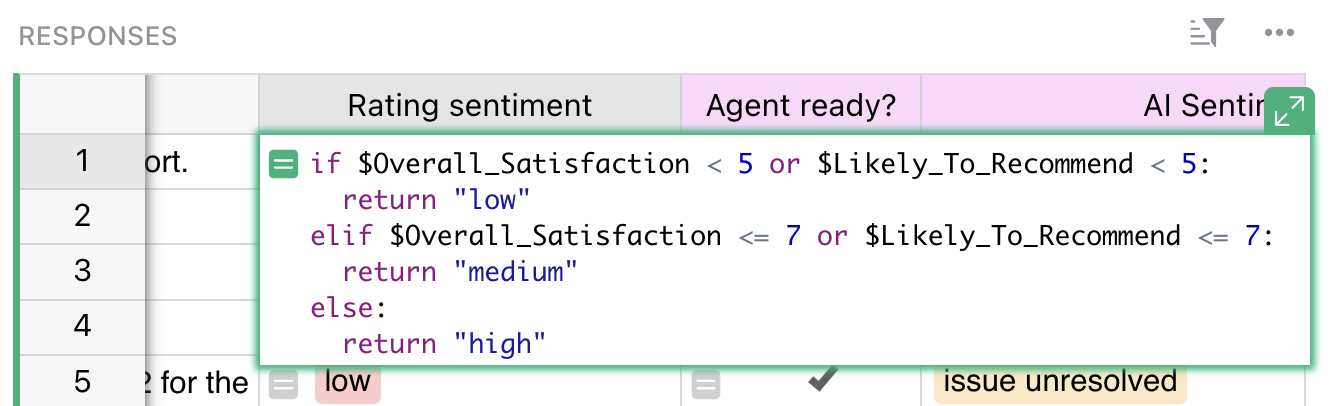
- For sentiment analysis, using a formula to transform numerical ratings from a feedback form into meaningful and actionable tiers.
- Finding characters, phrases or patterns in text with regular expressions.
- Simple text transformations/styling: adding paragraph breaks, capitalization, concatenation, Markdown markup, etc.
Focus
Efficiency
Stability
Human-in-the-loop
2. Design efficient AI triggers
Once you’ve decided which actions require AI assistance, you’ll need to make sure you have control and comprehension of where and how agents actually fire up. You don’t want to get to the point where your very clever, very connected workflow accidentally triggers a hundred tool calls because you accidentally entered junk data with the slip of a finger and now all your rows have changed.
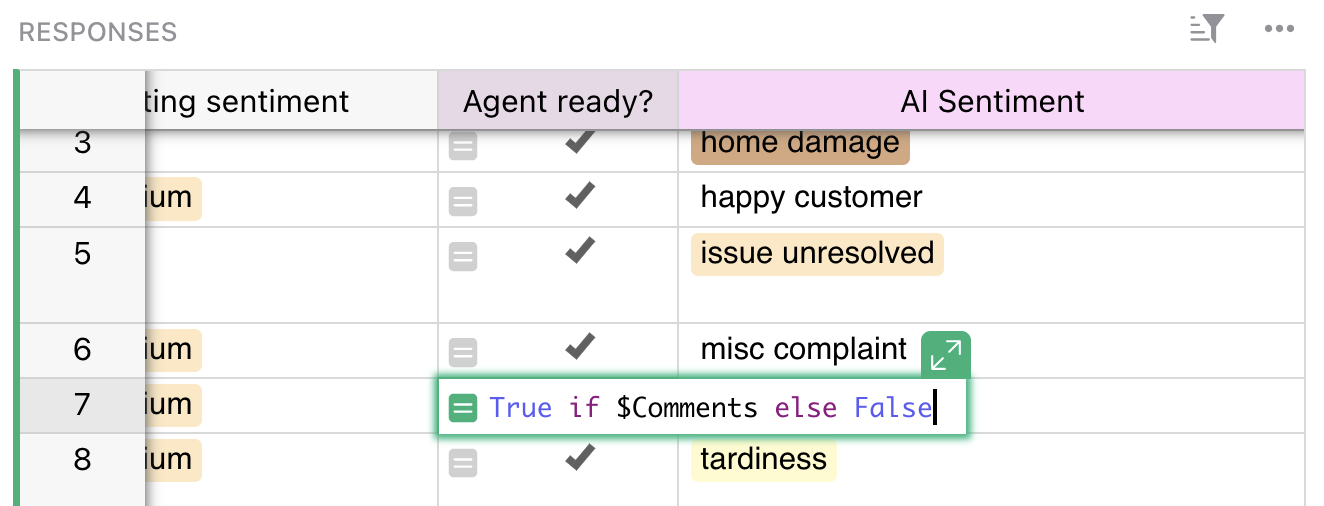
A handy trick is to create manually-triggered ready columns, which are simple toggles on each row that act like go buttons. When a human confirms the data is ready to be processed by an agent, flip the switch. These switches can be flipped from formulas as well, such as one that checks if each required column has data.
Focus
Efficiency
Sanity
Human-in-the-loop
3. Preserve source data
If you’re using MCP-triggered agents to process data, make sure they don’t replace the data! Make sure you have proper structure and clear rules for where the agent’s output should go. Don’t trust the model to avoid overwriting your source data.
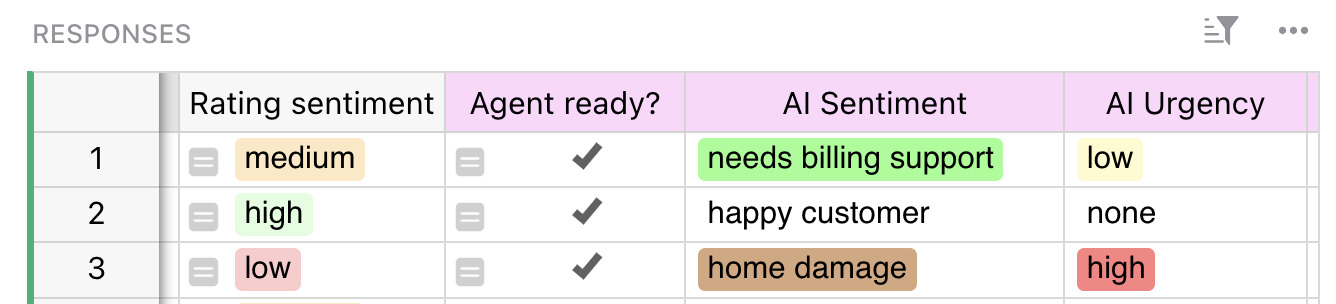
How to make sure you don’t lose data:
- Create and specify exactly which columns/fields the AI should be using for output.
- Be paranoid – even including an “AI” prefix in column names.
- Clearly delineate for human users which fields have AI-generated content in them. This helps clarify workflows and avoids people making changes that will be overwritten.
Focus
Stability
Sanity
4. Lead by example
If you’re working with purely existing data, this doesn’t apply. But if your agents are generating data (summaries, annotations, prose, etc.), then you should always take the time to manually create high-quality samples of what you’re looking for.
Aren’t models extremely good at making inferences? Yes. But humans are good at making assumptions, which models and humans have a hard time with. Expose the assumptions with some ideal targets, it often clarifies other aspects of your workflow.
And looking back to item 3, don’t overwrite these samples! Keep them as a reference that stays constant and update as needed.
Focus
Quality
Sanity
Human-in-the-loop
5. Have the AI rate itself
It’s easy to take AI-generated content for granted. It’s there, but is it any good? One semi-automated way to address this concern is to have agents give themselves confidence ratings, allowing humans to do quick spot checks.
This can be as simple as a “Confidence” column with choices like “High/Medium/Low”. The agent produces an output, and then rates its confidence (based on criteria you define). Then a human comes along and assesses the low confidence outputs, tweaks the skill, the trigger, or the confidence rubric and goes from there.
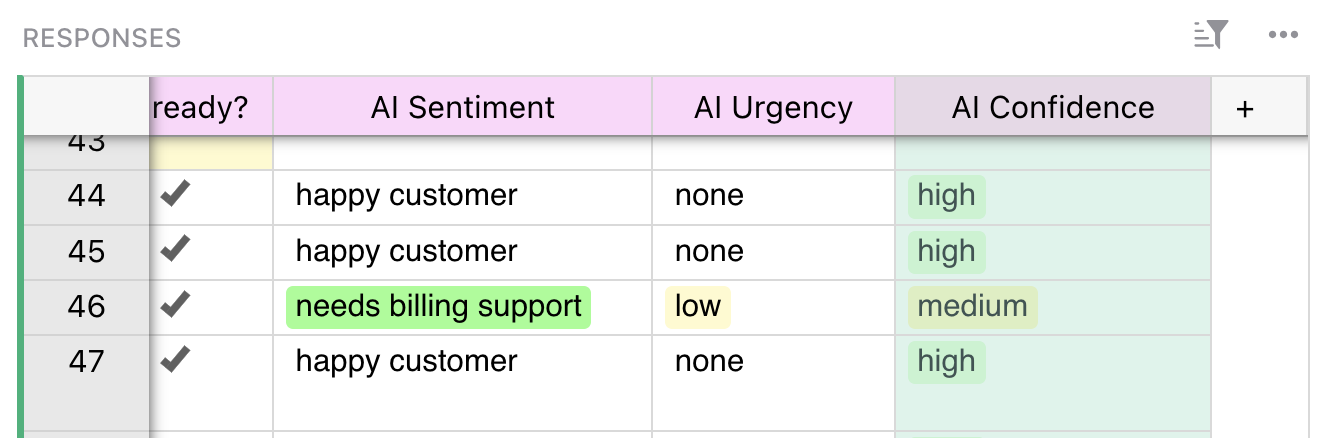
For more complex workflows, this also lets you check higher-level data quality by aggregating confidence rates for specific processes.
Focus
Quality
Stability
Human-in-the-loop
6. Create agent tests
Skill-building for MCP work is a whole topic in itself, but there’s one special tip to call out: you can include tests for the agent to evaluate while they’re executing the main prompt. These tests incorporate all of the elements discussed above!
Here are two examples that work together:
- “Before writing any data, note how many rows you are evaluating. Note which fields you may write to, and which you may not.”
- “After you write, check the document to see if you wrote to the expected number of rows, and wrote to the allowed fields: AI Sentiment, AI Urgency, and AI Confidence.”
This looks obvious, but it’s the kind of thing that can preserve long-term reliability.
You can also add instructions to help create an audit trail, like: “After fetching data from [service], write a small summary of your findings and sources in AI Audit and justify your conclusions.”
Focus
Quality
Stability
6. Iterate, then automate
All of these tips will help harden an MCP-driven setup, but perhaps the most important step is a two-parter.
First, before you start your brand new automation to run every x days until the end of time, do some manual babysitting with conscious iteration. This is especially important as new data comes in that may diverge from your initial and sample data.
Things you should be focused on during this stage:
- Trigger sensitivity. Are too many things triggering automations? Can elements be turned into deterministic formulas?
- Confidence criteria. Either tweaking the criteria if spot checks become unhelpful, or even removing checks if they are overwhelmingly passing.
- Edge cases. These can cause problems, especially if they should be ignored but aren’t.
- Skill feedback. Roll findings from spot checks and manual reviews back into the skill so that context and confidence isn’t lost.
After a period of manual iteration, you’ll feel much better about scheduling automations. Of course, you’ll want to keep checking in as results pile up, but by then you’ll be used to improvement.
Focus
Quality
Human-in-the-loop
See it in action
In this video, Grist CEO Anais designs a complex, human-led workflow with MCP.
She follows the above workflow, so you can see how each step looks in practice, and how Grist makes it make sense. If you want to check out the source document, you can find it right here.