
TL;DR
Microsoft Access survived in regulated organizations for one reason: it let a single person build a working database without a development team or a procurement cycle. For decades that was enough, but not anymore. Access can’t support multiple people working at once, can’t enforce permissions that mean anything, and can’t produce a effective audit trail. Grist fills the same gap Access always filled, the one between “we need a real application, on-prem with data sovereignty” and “we have no one to build it,” without those failures.
It all started with Microsoft Access, ESRI ArcView, and an assignment: to explore how to manage historical buildings with a GIS. The building I remember best was the little castle with its typical history of Andalucía, one of about forty structures in my undergraduate thesis dataset, each with its own place in Spain’s heritage registries. My job was to find maps of the monuments from different sources and identify the monuments and their parts.
Then came assigning legal status under national and local registries, tracking down restoration grants, and figuring out where the money would be best spent. The data existed everywhere: in binders, in laws and regulations from municipal, provincial, regional, and national levels, in the historical commissions, and the more I searched, the more sources appeared. No single place held it, and nothing tied it to a map that anyone could query. Problems that are still common today.
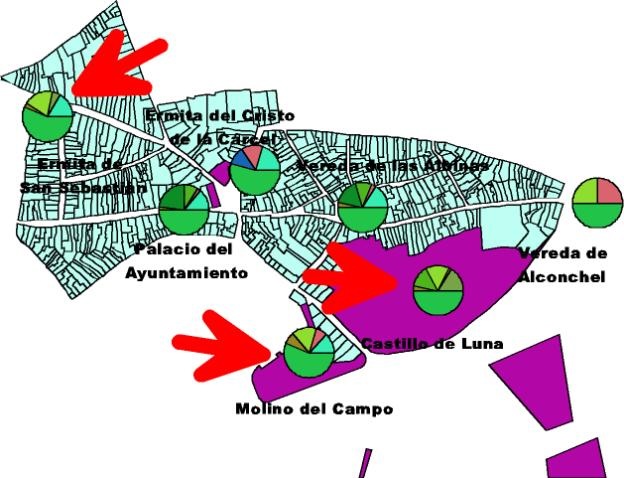
I needed to build that map myself. Microsoft Access held the records: building ID, historical data, funding source, condition notes, and importance level. I wired it to an ArcView application so the records sat on an actual map of a town near Seville, Mairena del Alcor; click a building and it pulled up the data. The Access file was stored on my hard disk with some of the shapefiles, while other maps were on a Windows network share; everything was tied to folder and file names, and there was no way to have multiple users accessing the application. No computer science department would have signed off on that architecture, but it worked. I built it alone, over a few months, without needing anyone’s permission. Access didn’t need a server, so there was nothing to provision.
That part matters more than it seemed to at the time. As an undergraduate architecture student, I didn’t have a dev team. I didn’t need one. This is exactly how Access ended up running inside more regulated organizations than most people realize.
The accidental relational database
Access was never considered a “real” relational database tool, especially not in the way SQL Server or Postgres are. It struggled with concurrency, had no real notion of a network, and its idea of “access control” was closer to a suggestion than a rule. It had a form designer, a table grid, and enough structure that allowed anyone who understood the problem, developer or not, to build something that held together.
That was the entire appeal, and for a long time, it was enough.
Access was a quick hack: a way to bolt a form and a table together fast enough that nobody had to file a ticket with IT. For years, fast enough was good enough.
People chose Access because it was the only tool in the building that could go from “we need to track this” to “we’re tracking this” in an afternoon. Every other option meant filing a request and waiting for a budget line.
Access is still running, decades later, in the kinds of organizations you’d expect to have modernized first: permit offices, hospital departments, government agencies. It still ranks in the top 15 relational databases worldwide.
The Access-shaped gap
Over the last few years, there’s been a real push to get organizations off Microsoft’s older desktop tools and onto something more modern. In Europe, the push to modernization is also anchored to data sovereignty.
Access survives inside regulated industries: banks, government agencies, healthcare providers, and engineering firms, where you’d expect compliance pressure to have killed it off first, not last.
Those are exactly the industries that need Rapid Application Development (RAD) and no-code tools the most. A permit office needs to define access rules for a case file. A hospital department needs to delegate who can approve what, and a preservation commission needs an audit trail on grant spending that could get reviewed years later. These are hard requirements that neither Access nor a spreadsheet can satisfy.
These organizations don’t have a standing team of developers to build that structure from scratch, and they are never going to get one. Regulated industries run lean on internal tooling, with most of the budget going to compliance and case work, not software engineering. Access filled the gap between “we need a real application” and “we have no one to build it.”
Two wrong answers
There are two ways people respond to that gap, and neither work well.
The first is to treat any surviving Access database as evidence of negligence – proof that some office never got around to modernizing. That misreads the situation. These offices used the only tool that let them do the job without a procurement process. Blaming the permit office for still using Access blames them for a gap they couldn’t effectively close.
The second is to rebuild the Access database as a modern web application, with real authentication and a real database. That sounds great… until you ask who’s going to build it. A bespoke internal tool means a dev team and a budget cycle that runs in quarters instead of afternoons. And then we’re back at the exact problem Access solved in the first place! If the requirement is “hire developers,” you haven’t given these teams a path forward. You’ve told them, again, that the path doesn’t exist for people like them.
Teams working in regulated industries have the expertise but lack easy-to-use tools that grant modern features: real time networked collaboration, permissions that mean something, data sovereignty. For me, building a GIS of historical monuments with Access was the natural choice in 1996. In 2026, the experts in regulated industries deserve better.
No-code and RAD in 2026
This is where Grist fits. It’s the same kind of tool Access (where one person can build without asking a development team for anything) except it holds up under today’s requirements.
The differences are unglamorous.
No more waiting on the file lock. Anyone who’s used Access in an office with more than one employee remembers the message: the database is locked by another user. Grist supports people working on the same data at the same time, the way work naturally happens.
Web access replaces the shared drive. An Access application lived wherever its file lived: a shared network folder, a VPN connection, a specific machine in a specific office. Grist lives at a URL, either self-hosted or used as a service. Grist applications follow the person doing the work instead of the drive they happen to be mapped to that day.
Permissions mean something. Access’s access control was close to nonexistent: if you could open the file, you could see and touch everything in it. Grist has row- and column-level permissions. It’s the difference between an audit trail you can defend and one you’re hoping nobody looks at too closely.
No inherited VBA to maintain. Most long-lived Access applications accumulate a layer of VBA macros that one person wrote, nobody documented, and the current staff is afraid to touch. Moving off Access has always meant confronting that layer. Grist’s automation doesn’t require reverse-engineering someone’s decade-old macro to figure out what it was doing.
None of this is effortless. Moving a real application, even a small one, still means moving data, checking assumptions, and testing that the new version does what the old one did. But now the project is something a team can do on its own timeline, without waiting for a development budget that was never coming.
Back at the castle
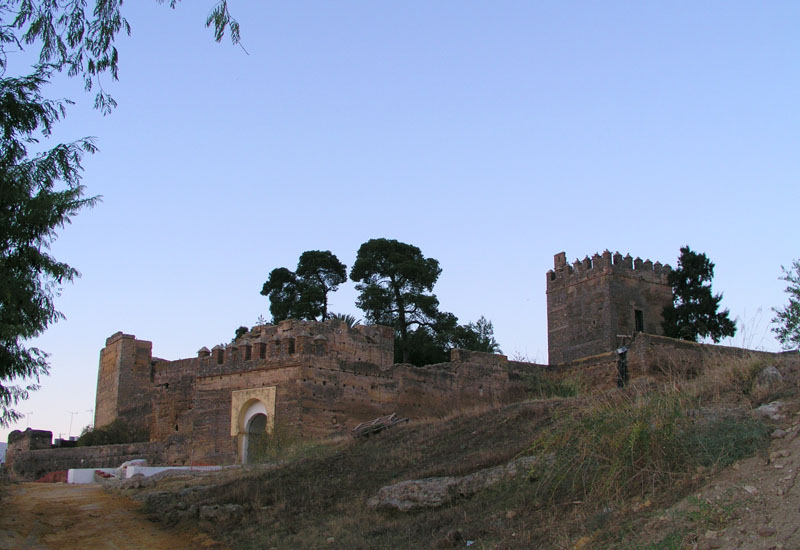
I don’t know what happened to that Access database after I graduated. Did it outlive my thesis? Did someone inherit it? Is it still sitting on a shared drive, completely forgotten? But I know what it would look like if I built it today. The map would still be the map. The records would still include the building ID, its monument classification, funding source, etc. The main difference is that I would use a modern tool like Grist so that the forms would be available to multiple users through a browser, together with the maps; there would be proper access control separating viewers and editors.
The people deciding on restorations of those monuments were not surprised when I presented them with a GIS using Access. They did the job with the only tool that they could handle themselves. The job hasn’t changed. Grist is the natural upgrade.

Stefano Maffulli, Chief Revenue Officer
