
If you’ve ever used “Suggesting” mode in Google Docs or “Track Changes” in Microsoft Word, you know how powerful they can be. Visit a document, propose changes in-line without overwriting the original, and let the document editor review, accept or deny your suggested changes at their leisure. It makes collaboration fast and flexible, with a lightweight review step to keep things sane.
Have you ever tried to do the same in a spreadsheet?
There is no “Suggesting” mode in Google Sheets! Why is that? Google Product Expert Alumni Lance.NYC gives one answer:
Suggest Edit would not make sense in a Spreadsheet environment. A formula has to execute, and you can’t see an alternate execution in parallel to the current formula like you can when editing text (original is there, and the suggestions are there too).
Maybe you’re only trying to edit some text entries, but since it’s a sheets environment, the feature still would not make sense. Many formulas use the content of text cells to make decisions or work with the text.
Lance isn’t wrong – formulas greatly complicate the suggestions flow. If you’re suggesting an edit to a formula itself, you’d need to execute both versions in parallel to compare results. And even if you’re only editing data, that change might trigger formulas to recalculate, cascading updates across the spreadsheet. Add in array formulas (where one formula spans many cells) and rendering a clean “before and after” becomes genuinely hard. It also helps us understand the limited nature of Excel’s “Track Changes” implementation (shared workbooks only, no tables, no reversion).
But there is hope. If data is structured, formulas apply predictably over entire columns, and their dependencies are well-defined. Similarly, if suggested changes happen on a copy of the document rather than the original, you can isolate each person’s edits and review them in manageable batches instead of untangling a single chaotic diff.
Grist has long had the bones of such a feature:
- Grist data is structured, which means a formula applies over a column instead of scattered cells.
- Grist already tracks changes made to a document, including changes to formulas and calculated values.
- Grist has long supported document forking: working on a copy, then merging changes back into the original.
This doesn’t make spreadsheet suggestions easy, but it’s a strong start that’s allowed us to release our first iteration without having to make any fundamental changes.
Visual learner?
Watch Anais break down suggestions using the examples in this post:
How Grist does suggestions
Suggestions in Grist are now live, yet in an experimental state. When suggestions are enabled on a document, contributors work on their own personal (and temporary) copy without modifying the original. Their edits are batched as suggestions, which are then submitted for review.
Document owners see what’s been proposed, by whom, and decide what to accept. They control what becomes permanent and canonical. For technical users, the experience will feel familiar to reviewing a GitHub pull request.
For contributors, we’ve tried very hard to make the experience lightweight. When a contributor opens a document, they’re automatically working on a copy — no need to know what a fork is or why it matters. Contributors open a document, make edits, and submit their changes when they’re done.
Let’s take a look at some examples.
Suggestions instead of a form
A form is a great way to capture a new row of data. But sometimes contributors need to see data in context to meaningfully contribute to a data set. We’ve seen data collaboration workflows where contributors refer to a spreadsheet, but have to fill in a separate form to make changes.
We’ve even done this ourselves! To keep track of the custom widgets shared by Grist users, we’ve unsurprisingly turned to a Grist document. This community widget tracker used to include a form that allowed users to submit their own contributions. It was a little awkward. If I’m a contributor and looking at data in context, why can’t I just add everything in context? How do I make updates to existing data? Specifying in the form “This isn’t a new widget, this is a new version of an existing widget, so only change this one field.” is not ideal. For the document owner, this submission is now a row of bad data that they need to clean up.
Suggestions allow editing in context, whether you’re adding new rows or modifying existing ones – you don’t even need a Grist account. If you’re crowdsourcing data or doing larger-scale data entry on a shared dataset, suggestions can be a huge improvement.
Suggestions instead of a CRUD app
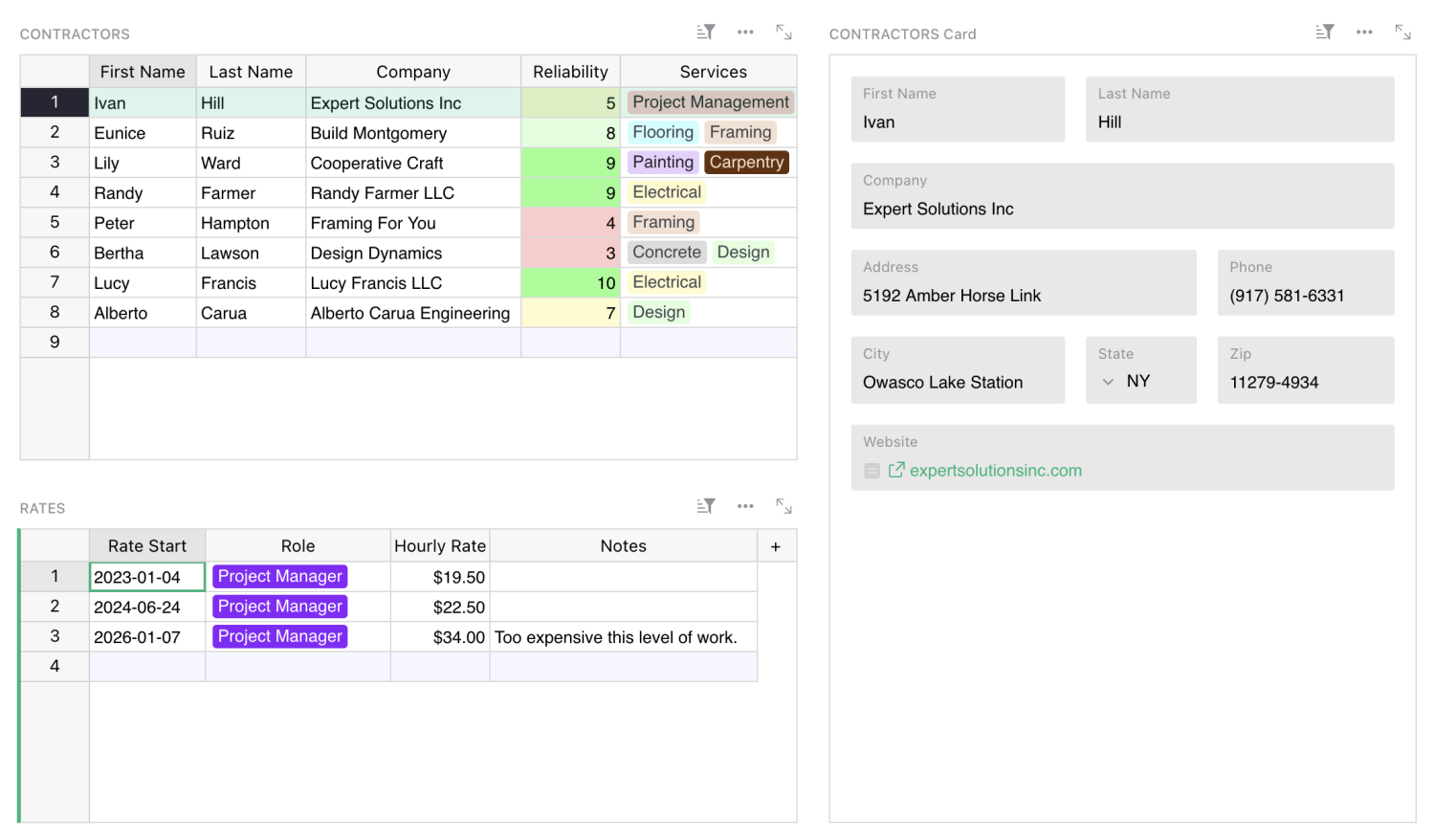
Suggestions can also be useful in spreadsheets shared privately within an organization. This is particularly true when there is a table of reference data used by many, but modified by few. Take, for example, a list of pre-approved vendors and contractors from which a company procures goods and services.
Often, a team will have this list in a spreadsheet that only some employees, like managers, can edit. But managers are rarely the people working directly with those vendors on projects, and they’re the last to know if anything material has changed with the vendor or if the quality of work has slipped. When the operation gets big enough, the manager is a bottleneck. They now have a spreadsheet that requires some kind of change moderation. Organizations often end up paying dearly for custom-built CRUD apps to create, read, update and delete their data.
Users have long been getting around this spreadsheet limitation with Grist’s granular access rules — managers can edit, non-managers can read and annotate in a “notes” column. But this is using a security feature to solve a workflow problem. What users actually want is change moderation, which is exactly what suggestions provide.
Suggestions to manage a carousel of contributors
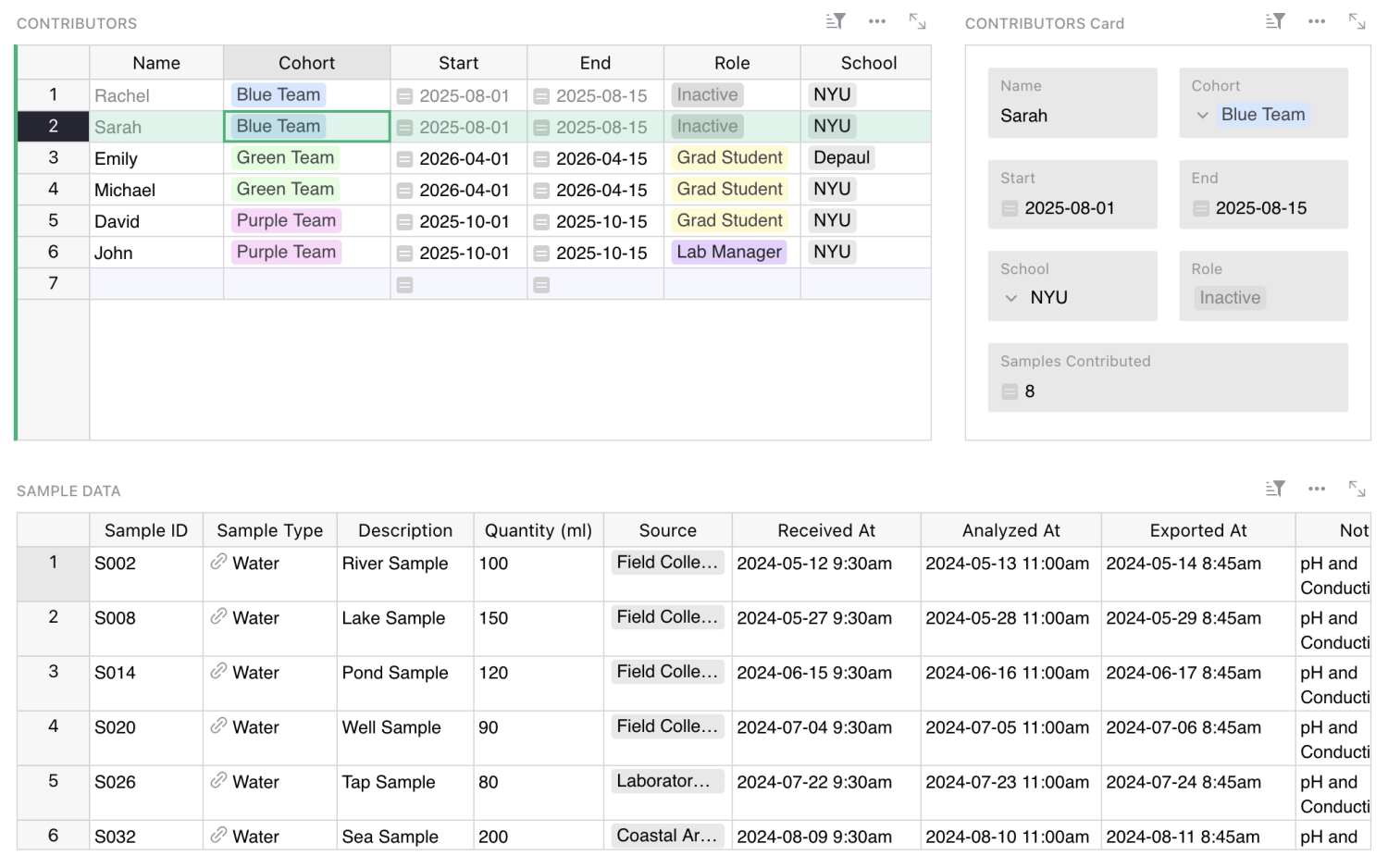
Collaboration doesn’t always mean regular contributions from a static team. Some work is cyclical or intermittent, and some requires contributors to rotate over time. Imagine a multi-year research project collecting data from a changing group of grad students. Contributors are constantly coming and going, and maintainers may change as well.
To keep things fluid, onboarding needs to be practically zero. A contributor opens a spreadsheet, adds rows following the visible structure, and leaves. For maintainers, the handoff is just as simple: grant someone owner permission, and they can start reviewing and approving changes immediately.
Try spreadsheet suggestions now
To try Suggestions, go to your Grist document’s settings and check the toggle “Enable suggestions”. Once enabled, all viewers (signed-in or not) will automatically create a temporary copy of the document on which they can make suggestions. Owners and editors can toggle between “editing” and “suggesting” mode, though only owners can accept or reject suggested changes.
This is our first version, and we’ve chosen to focus on the core use case: suggesting changes to data. That means the current release has some limitations:
- Data only. Suggestions track changes to cell values, not to structure, views, widgets, or formulas.
- No access rules. Documents with granular access rules aren’t yet supported.
- No forms. Documents using forms for data collection aren’t yet supported – though suggestions often replace them in practice.
We want to make this feature genuinely useful for the many use cases we have not yet considered. We’re looking for feedback, and we’re getting real meta: we’ve set up a Suggestions document for Suggestions feedback. Yes, you can suggest suggestions for Suggestions.
You can also share feedback in our community forum or Discord channel.
