
Your team doesn’t reach for spreadsheets because they’re careless. They reach for them because they need to get something done today, and the spreadsheet is right there. The trouble starts the moment sensitive data lands in one. A spreadsheet is a file, and a file gets emailed, copied, mis-sorted, and shared with people who were never meant to see it. None of the controls around your source system follow it out the door.
That’s why trying to lock down spreadsheet files one at a time never really works. The answer isn’t a tighter wall around the file; it’s governing the data inside it, down to the row and column, enforced live by the platform. A governed spreadsheet-database like Grist keeps data in one place instead of scattering copies, enforces real role-based, row-level access rules instead of cosmetic ones, and, because it’s structured underneath, heads off a category of human error that loose spreadsheets invite. Here’s how each plays out.
The export button is where your governance ends
Picture the setup. A team needs a tool that doesn’t exist yet, and waiting for IT to build one isn’t happening this quarter. So they build it themselves in a spreadsheet, and to do that they pull the data they need out of a governed system: a database, a CRM, or an internal app. That export is the moment the wheels come off. Row-level security, sensitivity labels, audit logs, all of it lives in the source system. The “Export to CSV” button leaves every one of those behind. What lands in the spreadsheet is just the data, with no memory of who was allowed to see it.
At best, that data now lives in a local Excel file. At worst, it’s been pasted into a third-party cloud tool like Google Sheets or Airtable that your security team never vetted. Either way, it’s outside your perimeter now.
Three ways good employees leak data through Excel
Let’s stay with the first case, the move from a governed system into Excel, because it’s the common one. Almost none of this is malicious. It’s people doing their jobs. But once the data is sitting in a spreadsheet, well-meaning employees leak it in three predictable ways: they share it too widely, they trust Excel “security” features that don’t actually secure anything, or they mishandle the data itself in ways only an unstructured spreadsheet allows.
Oversharing: one wrong recipient away from a breach
Start with the simplest failure: the spreadsheet goes to the wrong people. Sending data to the wrong recipient is the single most-reported type of data-breach incident to the UK’s Information Commissioner’s Office, the country’s data-protection regulator, and it has produced a steady run of six-figure fines.
It’s easy to picture how. In 2022, iCare, the workers’-compensation insurer for the Australian state of New South Wales, emailed Excel cost-of-claims reports to the wrong employers through a manual processing slip. 587 recipients got the wrong file, exposing data on roughly 193,000 workers. iCare called it “human error related to manual processing,” and the state regulator issued a formal letter of censure. A year later, South Lanarkshire Council, a local government in Scotland, answered a public-records request with a spreadsheet that still had a second, un-redacted tab inside it, publishing the names, salaries, and National Insurance numbers of about 15,000 staff.
Attackers know this is how companies operate, and they use it. In 2016, a Seagate employee got an email that looked like it came from the CEO asking for the company’s W-2 payroll data. Believing it was a real internal request, they sent the whole thing – Social Security numbers and salaries for just under 10,000 current and former US employees – to a stranger. Snapchat was hit the same way that same month. The employee wasn’t malicious. They were helpful, which is exactly what the scam counts on.
Every one of these gets better in a governed platform, and Seagate shows why most clearly. The scam works because the norm is that sensitive data lives in a file that gets emailed around on request. Take the file away and the whole thing falls apart. In a governed platform the CEO doesn’t need a payroll file sent via email: he’s either granted access to that spreadsheet data or he isn’t. There’s no attachment to ask for, no local copy to walk out the door. The phishing email doesn’t get caught by a smarter filter; it stops making sense as a request.
Hidden columns and password protection are security theater
When employees do sense the data is sensitive, they reach for Excel’s built-in “protection,” and this is where the false comfort sets in. In 2017, a Boeing employee emailed a spreadsheet to his spouse for help formatting it, not realizing the file carried the Social Security numbers and birth dates of 36,000 employees in hidden columns. Hidden, not removed. The data was right there for anyone who clicked “unhide.”
That’s the catch with Excel’s protection features: they’re built to prevent accidental edits, not to keep data from people. Microsoft says as much in its own documentation: “Worksheet level protection is not intended as a security feature.” And the protection is trivial to remove. A modern .xlsx file is really a zip archive. Rename it, open it up, delete a single line of markup, and the sheet “protection” is gone in under a minute, no password-cracking required.
When something does go wrong, there’s no real audit trail to fall back on. You can guess who had the file and roughly when, but you can’t reconstruct who opened it, who copied it, or where it went. You get some answers, never enough.
Why Purview, SharePoint, and DLP can’t govern your spreadsheets
This puts security teams in a real bind. Ban Excel and you make shadow IT worse, because the underlying need doesn’t go away; people just route around you more quietly. So the usual move is to govern Excel in place with the Microsoft stack: Purview labels, SharePoint permissions, DLP. It helps at the edges, but it’s a softer version of the same theater.
The core problem is that all of it is file-level, not field-level. Permission to open the file is permission to see everything in it. There’s no row-level security, no role-based access to a single column or tab, enforced live inside the workbook. Purview’s protections are real but conditional: automatic labeling is an E5-only feature, users can decline labels, and it skips legacy formats like .xls. And the instant someone exports to CSV, every label and every trace of metadata is stripped clean.
DLP has the same reach problem, weak on data at rest and prone enough to false alarms that teams loosen the rules until the gaps get wide.
Real access control: rules enforced server-side, not painted on
This is the difference between hiding data and controlling who can reach it. Grist enforces security at two levels.
- At the platform level, admins get a clear view of who can open which document and at what permission, with the ability to cut off access in a click. Installation-wide audit logs stream user activity to your SIEM.
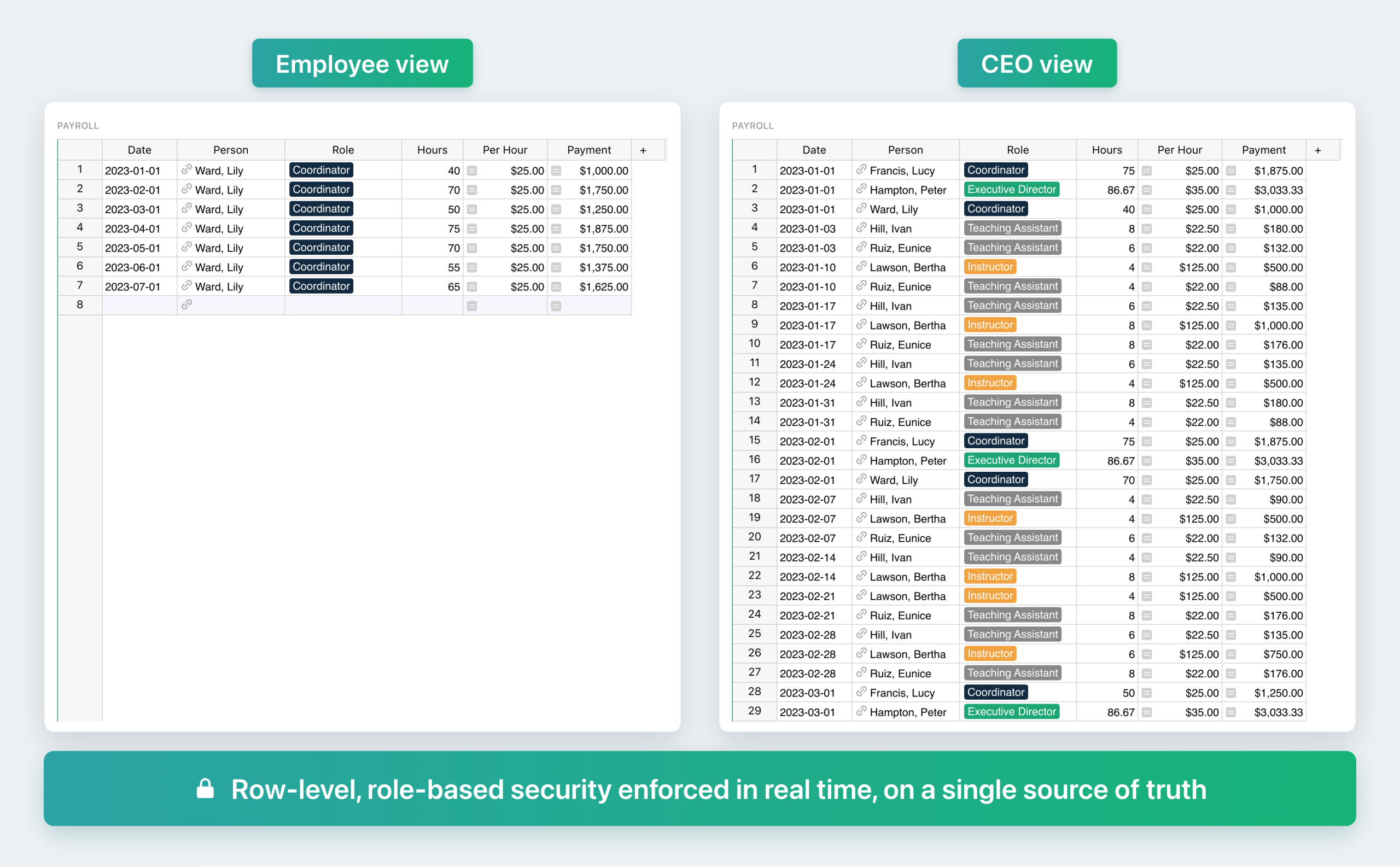
- At the document level, each spreadsheet carries granular permissions: role-based access, row-level security, and rules based on custom user attributes.
What makes these rules real rather than cosmetic is where they run. Access rules are enforced server-side, at the data layer. If a user isn’t entitled to a row or a column, it’s filtered out before the response ever leaves the server, so the restricted data is never in what they receive. There’s nothing to un-hide, because it was never sent, and there’s no back door through the API or a hand-built view, because those get the same filtered response. A hidden column is security through obscurity: the data is still in the file, one right-click away. An access rule is access control, because the data is never served.
When a spreadsheet loses track of who’s who
There’s one more risk, and it comes from the shape of a spreadsheet itself. In 2024, an employee at IRCC, Canada’s federal immigration department, was preparing notifications in a spreadsheet and sorted it after applying a filter to only 11 of its 12 columns. The email column didn’t move with the rest. 497 people applying for work permits and permanent residence received someone else’s notification, exposing names, addresses, client ID numbers, and the sensitive fact that they’d applied to immigrate. Canada’s federal privacy regulator opened an investigation.
This is a failure only a spreadsheet can produce. A spreadsheet keeps a person and their email address together by accident: they’re two cells that happen to sit in the same row, and a stray sort can pull them apart. A database keeps them together. The email belongs to the record, not to a spot on a grid. Re-sort and re-filter all you like; the field can’t leave its row. That failure mode doesn’t exist.
The real fix for shadow IT: a better spreadsheet, not a ban
Which brings us back to where we started. People reach for spreadsheets to build the tool they need right now, and telling them no just sends that work underground. The fix is to say yes to something better: a governed, on-prem spreadsheet-database that feels like a spreadsheet and works like one, with formulas that recalculate live and data that updates in place, but with a real database underneath and real access control on top.
From there it becomes the tool people actually wanted. They can drag and drop linked views, or build a custom view with your organization’s own vetted LLM, since Grist lets you bring your own model. This is how you finally get ahead of shadow IT, because it fixes the reason shadow IT starts.
When colleagues can’t shape their own tools, they rebuild them in ungoverned spreadsheets, or start vibe-coding something no one will maintain. Because a Grist app is a single file in one format, it’s also well suited to secure, coherent vibe-coding, all inside your perimeter. Give people something simple and powerful, make it easy to do the right thing while getting the work done, and they’ll build what they need without routing around you.

Anais Concepcion, CEO
